
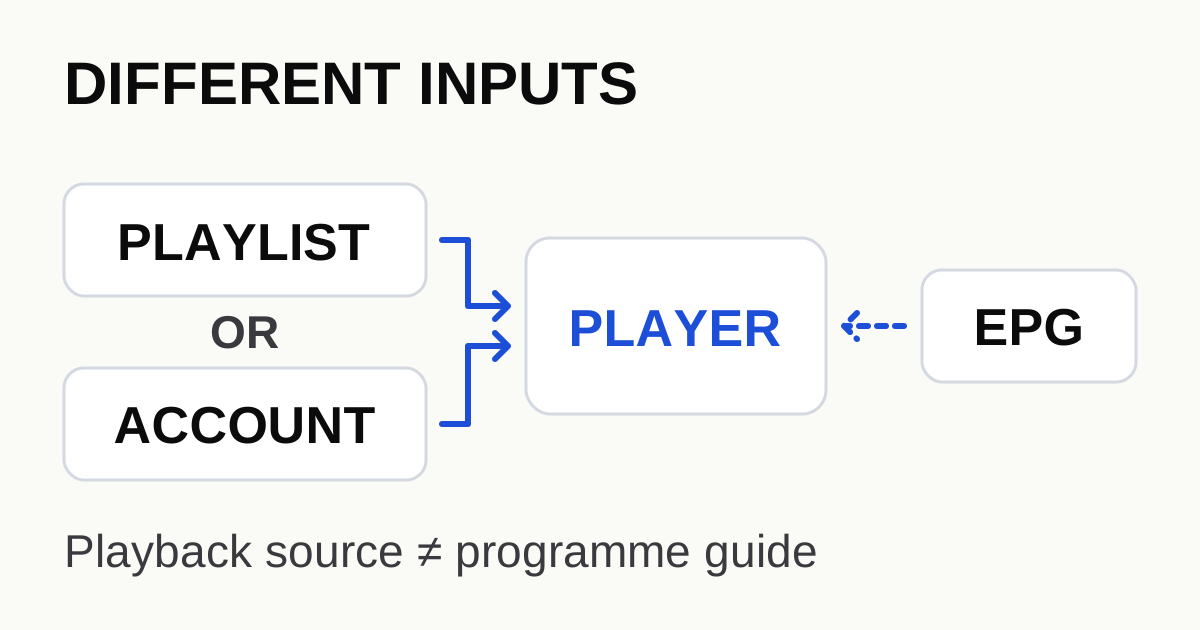
Use the input type your player asks for. An M3U playlist supplies a list of playback sources. An Xtream-style sign-in uses service account details through a player's supported integration. An EPG supplies programme information, commonly through XMLTV in players that support it. None of these is the same thing as purchasing the player application.
The application and the channel source are separate
A Reddit question from 10 March 2021 asks why a playlist and an EPG appear as separate sources in TiviMate. The confusion is understandable: both are added during setup, but they do different jobs.
The developer's TiviMate listing identifies it as a player and lists support for inputs including M3U, Xtream Codes and Stalker Portal. It also states that the application does not provide channels or content. A player upgrade can unlock application features; it does not create a content subscription.
Keep three questions separate: which application is installed, which service supplies the streams, and which account or playlist that application will use. If any one is missing, buying or reinstalling the other component may not solve the problem.
Recognise the input before choosing an import screen
| Input | Typical purpose | What to check |
|---|---|---|
| M3U playlist URL or file | Lists stream entries for a compatible player | Choose the player's playlist URL or file option, not its programme-guide field |
| Xtream-style account details | Sign in through a supported service integration | Use the supplied server address and account fields exactly as that player requests |
| EPG / XMLTV source | Supplies programme titles, times and channel identifiers | Use an EPG option supported by the player; verify channel matching and time settings |
| Player purchase or premium upgrade | Enables application features under its own terms | Do not mistake the purchase for a source of channels or service credentials |
These are practical categories, not a promise that every player offers the same screens or accepts the same server behaviour. “Xtream Codes” is a commonly used integration label, not a universal interchange standard you can assume from a URL's appearance alone.
The OTT Navigator FAQ describes how that player distinguishes account templates from a playlist or downloaded M3U file. Its example of a get.php address with account parameters is conditional guidance for that application. Do not rewrite an unfamiliar service URL or remove parameters just because it resembles somebody else's example.
A working channel with an empty guide is a different problem
The Kodi PVR IPTV Simple Client documentation describes M3U stream sources and XMLTV programme-guide data separately. In that implementation, an M3U channel's tvg-id can match the corresponding XMLTV channel identifier. That explains why a valid stream entry need not automatically produce a correctly matched guide entry.
If the video plays but the guide is blank, check the guide source, its update state and the channel association before changing a decoder or treating the stream URL as broken. If titles appear at the wrong time, first confirm the device time zone and the player's supported EPG offset controls. Do not move a working playlist into the EPG field.
If the entire playlist is empty or sign-in fails, focus instead on the import type, the exact fields, account status and the player's error. A blank guide alone does not establish that the subscription has expired.
Finish with a small import record
- Identify the player. Record the exact app name, platform and version; similar names do not prove that two applications have identical setup fields.
- Identify the supplied input. Is it an M3U URL, a file, a set of account fields, or a separate guide URL? Keep the labels from the service's instructions.
- Choose the matching option. Use the player's official documentation or supported import menu; do not try every field with the same string.
- Confirm a small result. Does a channel list appear? Can one item play? Does its programme information match? Record these as three separate outcomes.
- Ask a precise question if something is missing. “The list imports and one channel plays, but its XMLTV guide is blank” gives more information than “the app does not work.”
The resulting record should identify the missing layer. It need not expose the credentials. If the application cannot be installed on the device in the first place, stop here and use the device/player compatibility guide before investigating account formats.
Do not publish a playlist link as a troubleshooting screenshot
A playlist or guide address may contain a username, password or access token in its query string. Redact the entire sensitive value, not just the final characters. Crop account names and QR codes from screenshots as well. A public helper usually needs the input category and error, not a working account URL.
Player and version: [app / platform / version]
Import type: [M3U URL / M3U file / supported account login]
List loaded: [yes / no]
One stream plays: [yes / no]
Guide loaded and matched: [yes / no]
Error message: [credentials removed]
Separate guide supplied: [yes / no / unknown]
Continue at the layer that failed
Once playback is established, repeated stalls belong in the controlled buffering checklist, not in a new guess at the account format. For this site's starting workflow, use the setup guide. Service-specific input availability should come from that service's actual instructions, not from an assumption that every subscription provides every format.
Sources and scope
Research checked on 15 October 2026. The Reddit thread identifies a user question; the technical examples below come from their named implementations and should not be read as universal player specifications.
- Reddit: the difference between playlist and EPG — original question, dated 10 March 2021.
- TiviMate's developer app listing — supported input labels and the distinction between player and content.
- Kodi: PVR IPTV Simple Client — M3U, XMLTV and channel identifier matching in that client.
- OTT Navigator FAQ — application-specific provider templates and playlist options.